# New Player Guide
Welcome to Legendary Roleplay, you've just loaded into the server for the first time and are asking yourself where to go from here? This guide will help you get started and give you some tips on how to get started in the server.
Some required essentials before reading on\
Before you read on, you should...
* Have a working microphone
* Have basic knowledge of what roleplay is
* Decide on a character and their background
* Read our [community rules](/legendary-roleplay-fivem/legendary-roleplay/community-rules.md)
* Know what the following is:
* RDM (Random Deathmatch)
* VDM (Vehicle Deathmatch)
* NLR (New Life Rule)
* Metagaming
* Fail RP
* Fear RP
***
**Basic Controls**\
Before you can start role playing, you need to know some of the basic keys and commands available in the server:
**General**\
P - Open the phone\
K - Open the inventory\
U - See players online and their player IDs\
E / Left Alt - Interact\
N - Default push-to-talk key\
Y - Change your voice range (whispering/talking/shouting)\
Ctrl - Crouch\
Z - Prone\
1-5 - Use the items in your hot bar\[/div]
**In-Vehicle**\
F - Enter and exit vehicles\
L - Lock and unlock the closest vehicle\
H - Turn your headlights on/off\
E - Honk your horn\
B - Put on or take off your seatbelt\
Z - Toggle cruise control\[/div]
**Commands**\
/ooc - Out of character chat for technical problems\
/looc - Local out of character for specific situation\
/me - Display an action you are doing, i.e. /me performs CPR\
/report - Report a player or situation to staff (Include player IDs if possible)\
/carry - Carry the closest player\
/trunk - Access a vehicle's trunk\
/door - Open a vehicle's door\
/seat 1-6 - Switch to a different seat inside a vehicle
You can read more about keybinds and controls [here](https://docs.opfw.net/controls).
***
### Creating your character
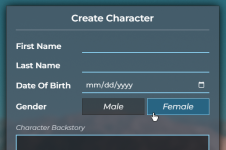
After you've loaded into the server, you will see 4 empty character slots. To create your character, click the "New Character" button on one of them.
This will open the character creation menu. Here have to fill out your characters first and last name, their birthday, gender and their backstory. Choose wisely, you will not be able to edit this later!
***
#### Character Appearance
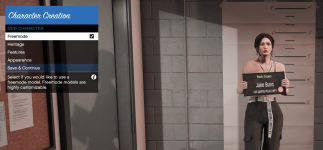
Once you've completed creating your character, you will be prompted with a menu to change the look of your character to your liking. If you decide to select a non-playable character (Anything other than the freemode models that are selected by default) as your main character, you will not be able to change any clothing, etc. later. For more in-depth tutorial, check out this video: [here](https://youtu.be/4q2CAdy_pAg).
If at any point you would like to change your clothing, you can visit a clothing store to do so! While you can change your clothing, makeup and hairstyle, you will not be able to change things like skin color, face, etc. once finished with the creation of your character.
***
### Getting Started
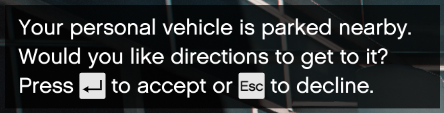
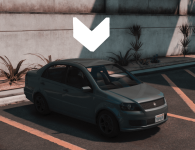
When you finish your character, you will notice that you spawn at the airport and that you will need to make your way into the city. You will see a popup at the top left of your screen asking you if you want directions to your personal vehicle. When you create a character, you get a free starter car to help you get around the city, you can now claim it by pressing enter. Once you've pressed enter, you can now follow the directions to your car.
If driving is not your thing, you can also walk, use your phone to call a taxi or get a friend to pick you up.
***
### Stores and supplies
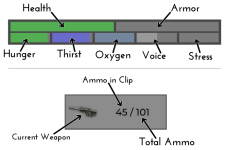
Once you've made your way into the city, it's time to get some supplies! You can find a variety of stores around the city that help you cover your basic needs. As you've maybe noticed, your hunger and thirst will slowly decrease over time.
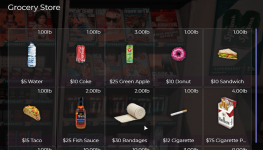
You can purchase food and drinks at grocery stores (Use left alt to talk to the store clerk). You can also purchase a variety of other items at these stores such as phones, bandages, cigarettes, etc. Bandages are useful to have on hand in case you are injured and need to heal yourself, cigarettes are helpful to reduce your stress level.
Grocery stores require you to pay in cash. You start out with some money in your bank account (use /bank to check your balance) and a little bit in cash (/cash to check your cash balance). You can also withdraw more cash from any bank or ATM in the city (must use left alt and hover over atm).
***
#### Your phone
Your phone is one of the most useful things in the Legendary server. You can contact emergency services, access Twitter, call your friends, and a few other features. To access the phone, you will want to press "P". To access all the apps, you can click the bottom most button on the phone.
**Apps**\
Yell - Your basic news/community feed where people can post public messages\
Phone - Can be used to contact emergency services in the favorites tab and call others\
Messages - Can be used to text numbers and send your GPS coordinates\
Contacts - Used to save phone numbers. You can also text someone from this application\
Settings - View your phone number and change phone settings\
Bank - Used to view how much money you have in your bank account\
Camera - Use your camera. You can zoom in by scrolling, or even take a selfie by hitting the up-arrow on your keyboard\
Dark Chat - A secret way to have a group conversation\
9GAG - Have a look at a few memes! To look at the next picture, hit the right arrow key on your keyboard. To go back, hit the left arrow key on your keyboard
***
#### Citizen Card
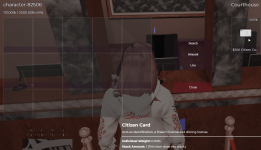
Your Citizen Card is a very important document. It is used as your drivers license, firearm license, and ID. You can purchase it at the courthouse.
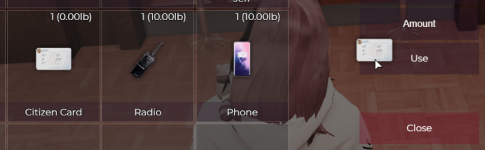
You can show your Citizen Card to other players by opening your inventory (press "K") and then dragging it to the "Use" field, use your middle mouse button, Or by moving it to your hotbar and pressing the respective key (1-5).
***
#### Getting a Job
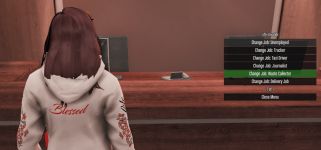
To get your first job, you will need to make your way to the Life Invader building (the red briefcase labeled "Apply for a Job" on your map). You will have a few jobs you can choose from. Some of them will pay better than others. Check out our [Basic Job Guide](/legendary-roleplay-fivem/helpful-guides/basic-job-guide.md) for help with any of the jobs.
Not all jobs are available through Live Invader and you will have to apply for them through RP on on the Discord.
***
---
# Agent Instructions: Querying This Documentation
If you need additional information that is not directly available in this page, you can query the documentation dynamically by asking a question.
Perform an HTTP GET request on the current page URL with the `ask` query parameter:
```
GET https://legendary-roleplay.gitbook.io/legendary-roleplay-fivem/helpful-guides/new-player-guide.md?ask=
```
The question should be specific, self-contained, and written in natural language.
The response will contain a direct answer to the question and relevant excerpts and sources from the documentation.
Use this mechanism when the answer is not explicitly present in the current page, you need clarification or additional context, or you want to retrieve related documentation sections.